

Download video for better resolution.
For further assistance email bloggerdesigns [at] gmail [dot] com
1. Click on the Get Template link to download the script and images.
2. If you do not already have a Photobucket account create a free one and upload the images there. Make sure to select the 17" screen size before uploading.

3. After uploading Copy the URL (without the file name.) which appears in the textbox below the uploaded image.

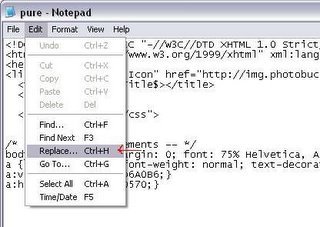
4. Open the template script file in Notepad.
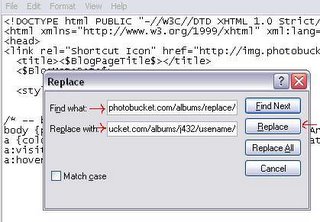
5. Find and Replace http://replace.photobucket.com/albums/replace/ with the URL you copied from the textbox which should look something like this http://i20.photobucket.com/albums/j432/usename/
6. Now Copy the entire text in the script file and Paste into your blogger template.
7. Save and then Republish.
8. If you receive the following error message 'Your template could not be parsed as it is not well-formed. Please make sure all XML elements are closed properly.
XML error message: The markup in the document preceding the root element must be well-formed.' scroll down the page and click on Revert to Classic Template.

Why should you advertise here?
This site has been established since December 2005. Since the last one year it has consistently drawn over 41000 visitors per month (122000 page views) of which close to 90% are new visitors.
Blogger Templates Stats
Google Page Rank: 5
Over 41,000 visitors per month
Over 122,000 page views per month
Over 36,000 backlinks
Interested advertisers please leave a message or email bloggerdesigns [at] gmail [dot] com
All ads are non rotating.
Subscribe to:
Posts (Atom)